Featured Stage
Piano Master
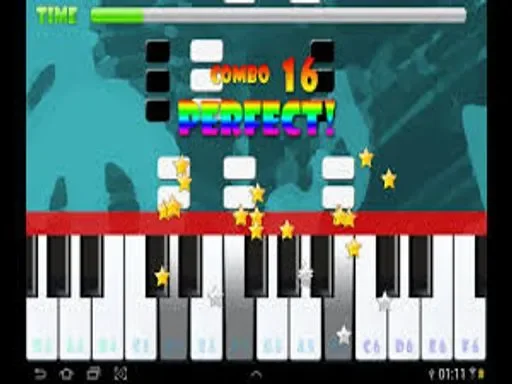

Play Piano Master as a Rhythm Challenge, Not a Music Lesson
Piano Master is a quick-reaction music game built around a simple rule: tap the right tiles at the right time and keep the song moving. You do not need sheet music, formal piano training, or long setup. A round starts, the tiles scroll, and your focus narrows to timing, rhythm, and clean inputs. If you hit correctly, the melody continues. If you miss a required tile or tap the wrong place, the run ends and you restart immediately.
That short loop is exactly why this type of game works so well in a browser. Sessions can be brief, but progress still feels real because your timing improves from run to run. The goal is not only a higher score. The real objective is consistency under speed: staying relaxed while the chart becomes dense, keeping your eyes ahead of the current row, and matching taps to musical pulse instead of panic clicking.
What the Core Gameplay Loop Feels Like
Each song pattern is represented by falling or scrolling lanes of tiles. Most of the time, dark tiles are the valid notes and empty or light spaces are mistakes. You read the lane pattern, tap in sequence, and keep surviving as tempo and complexity increase. Early moments are forgiving. Mid-round sections test alternating hands and rhythm memory. Late sections demand control under pressure, especially when short bursts appear back to back.
A typical round has four mental phases. First, recognition: identify lane spacing and tap cadence. Second, stabilization: build a smooth rhythm and stop over-correcting. Third, acceleration: react to faster groups without tensing your hands. Fourth, endurance: maintain accuracy during fatigue when one rushed input can end the run. Strong players treat these phases differently instead of playing every second with the same intensity.
Because this is an HTML5 browser title, performance can vary by device, tab load, and network conditions during initial startup. Once loaded, the most important factor is input discipline. Light taps and controlled finger travel usually outperform hard, frantic presses. Rhythm games reward economy of movement, and Piano Master is no exception.
How to Play on This Site
On this site, opening Piano Master should launch the game directly inside the embedded frame. Wait for the game canvas to fully load, then start with an easier song or mode if choices appear. On desktop, you usually play with mouse clicks or trackpad taps. On mobile or tablet, touch input is the default. Keep your browser zoom at 100% so tile alignment stays predictable, and avoid switching tabs in the middle of a run to reduce stutter risk.
If the embed appears paused or muted, click once inside the frame to focus it, then start again. Some browsers gate autoplay audio until first interaction, so one initial click is normal. If controls feel delayed, close heavy background tabs, disable battery saver mode, and refresh the page before another attempt. Small latency fixes can change a near-fail run into a clean clear.
Control Basics
Desktop: click each valid tile as it reaches the hit area. Keep your wrist steady and use short finger movements rather than large cursor travel. Mobile: tap directly with one or two fingers depending on lane density. For higher speeds, split lanes between left and right hands so each hand owns part of the pattern. In both cases, prioritize timing over force. Fast but inaccurate tapping loses more runs than slightly slower, precise taps.
Practical Tips That Improve Scores Quickly
Start below your ego level. Many players pick the hardest chart too early and train bad habits. Choose a manageable speed and aim for three clean runs in a row. Then increase difficulty one step. This builds transferable timing instead of random lucky clears.
Use look-ahead vision. Do not stare only at the tile you are tapping now. Track one to two beats ahead so your hands are prepared before the next cluster arrives. In dense patterns, anticipation matters more than raw reflex.
Play to the beat, not to the graphics alone. Visual reading is necessary, but listening to rhythmic accents helps stabilize timing during visual clutter. If you feel rushed, briefly soften your gaze and lock back onto the song pulse.
Train hand roles. On two-hand play, assign lane responsibility and keep it consistent. Constantly swapping who handles which lane creates collisions and late taps. Consistent hand ownership reduces decision load and improves stamina.
Take short resets. After two or three frustrating misses, pause for one minute. Tension causes over-tapping, and over-tapping causes chain errors. A brief reset often restores precision faster than grinding tilted attempts.
Common Mistakes and How to Recover
The first common mistake is tapping too early during speed spikes. Players anticipate so aggressively that they trigger misses before tiles reach the hit zone. Recovery: during fast sections, keep taps compact and delay slightly to center on the actual target point.
The second mistake is tunnel vision. You fixate on one lane and ignore side lanes until it is too late. Recovery: practice scanning in a shallow Z pattern across lanes while still hearing the beat. This widens awareness without losing rhythm.
The third mistake is panic after one near miss. Many runs end not on the first error but on the next two rushed corrections. Recovery: if you feel a wobble, simplify for one second. Re-anchor on the main pulse, then rebuild speed.
The fourth mistake is poor setup. Playing on low battery mode, unstable Wi-Fi during load, or cramped posture adds hidden difficulty. Recovery: stabilize your environment first. Rhythm games expose tiny friction points, so technical comfort is part of skill.
Background and Release Context
Piano Master belongs to the wider piano-tile rhythm genre that became globally popular after the 2014 rise of Don’t Tap the White Tile, launched by Umoni Studio. The core fantasy has stayed consistent across many later titles: turn simple tap inputs into musical performance pressure. Over time, this format expanded from mobile apps to browser-based HTML5 versions distributed through game portals and embed networks.
This specific Piano Master build follows that modern portal model. The structure favors quick access, short sessions, and broad device compatibility. Instead of installing an app, players can jump in through an embedded page and start immediately. That convenience is a major reason these games remain active: they are easy to learn, hard to master, and ideal for repeat play when you have a few minutes but still want a measurable skill challenge.
FAQ
Do I need real piano experience to enjoy Piano Master?
No. Musical training is optional. The game is about timing, pattern reading, and rhythm consistency, so beginners can improve quickly through repetition.
Which mistake ends most runs?
Missing a required tile or tapping an invalid space usually ends the run instantly. Accuracy is more important than aggressive speed in early improvement stages.
Is Piano Master better with one hand or two?
For slower charts, one hand can be enough. For faster or denser patterns, two hands are usually better because they reduce finger travel and reaction bottlenecks.
Why does the game sometimes feel delayed in browser?
Perceived delay can come from background tabs, power-saving settings, or temporary frame drops. Refreshing, closing heavy tabs, and keeping stable focus on the game frame often helps.
How can I raise scores without just playing longer sessions?
Use focused sets: pick one manageable chart, target clean streaks, and review why each miss happened. Quality practice for ten minutes often beats unfocused grinding for an hour.
Is this game only for short casual play?
It works for quick sessions, but it also supports deeper mastery. As speed rises, the game becomes a serious test of rhythm control, hand coordination, and mental composure.
Comments
Loading comments…